Which countries own the shops you pay?
Add a bank statement and see your spending by the country that owns each business.
- Read on your phone. Amounts, dates and balances never leave it.
- Only shop names it doesn't know are looked up, and you see the list first.
- Free. No account, no ads, nothing to install.
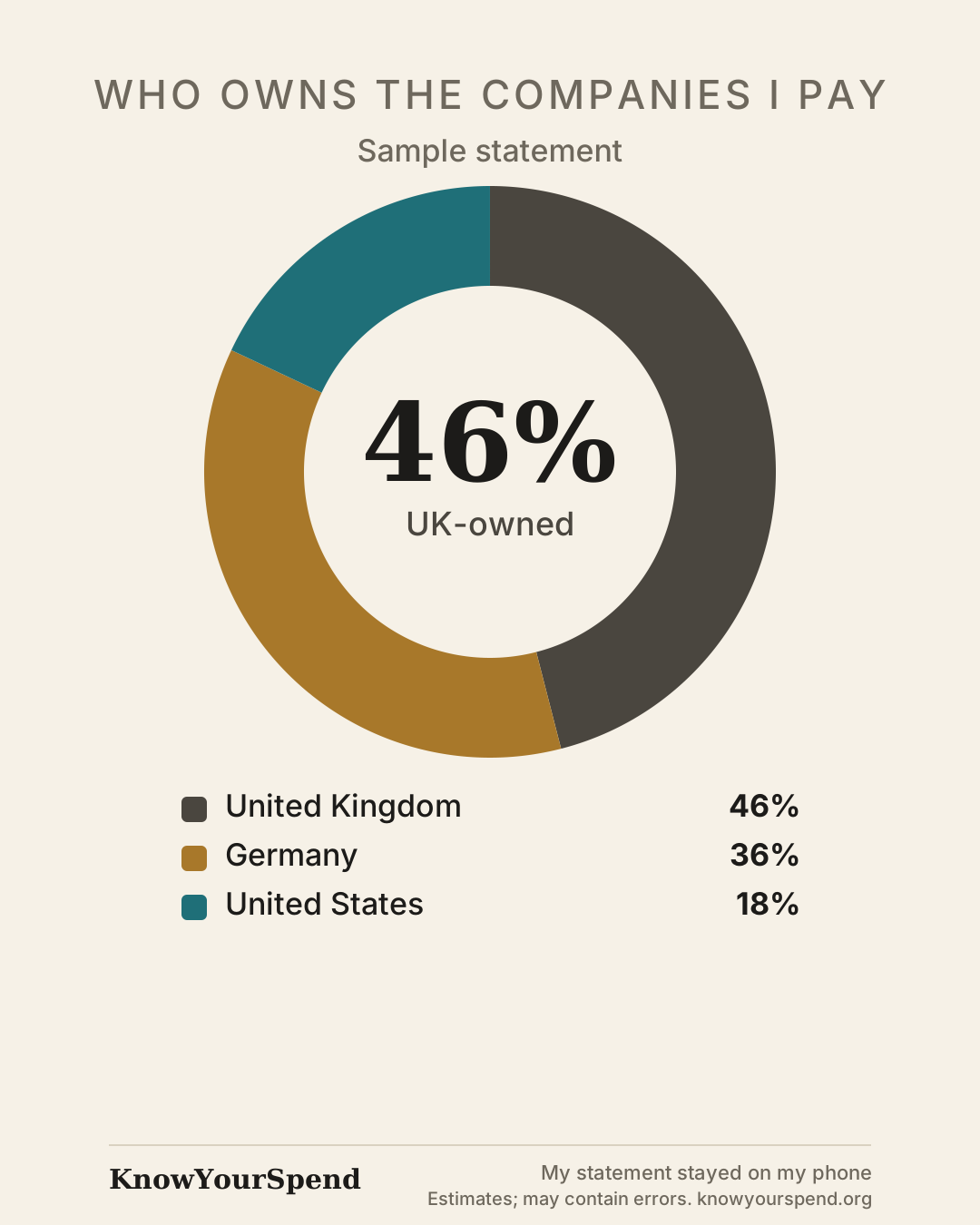
Sample result · made-up statement
54% went to companies owned outside the UK
- United Kingdom46%
- Germany36%
- United States18%
Who you pay most
- TescoTesco PLC · United Kingdom
- AldiALDI SÜD · Germany
- LidlSchwarz Group · Germany
- AmazonAmazon.com, Inc. · United States
How it works
Save a statement from your bank
In your banking app, find Statements and save one as a PDF or CSV. The app has step-by-step guides for 13 banks.
Add it to KnowYourSpend
It's read on your phone, usually in a few seconds. Nothing to sign up for.
See who you pay
Your spending by the owner's country, the companies you pay most, and where each answer came from. Snap a till receipt to see the brands in your basket too.
- 12 OctTESCO STORES 3456 LONDON£64.20United Kingdom
- 12 OctAMZNMKTPLACE AMAZON.CO.UK£17.49United States
- 13 OctLIDL GB LONDON£27.30Germany
- 14 OctNETFLIX.COM£12.99United States
- 15 OctGREGGS 1234 LONDON£4.10United Kingdom
- 16 OctSQ *THE OLD BAKEHOUSE£7.20United Kingdom, estimated from where you paid
- 16 OctJANE SMITH DINNER£25.00A person: not counted, never sent
- 17 OctALDI 84 GREENWICH£31.60Germany
Is it safe to add my bank statement?
Your statement is read on your phone, not uploaded. Here's exactly what stays and what can leave.
Stays on your phone
- Your statement file
- Amounts, dates and balances
- Account and card numbers
- The names of people you pay
- Receipt photos, which are read and then thrown away
Can leave, only if you let it
- The names of shops the app doesn't already know, so it can look up who owns them. Names that look like a person or something sensitive are held back, you see the list before anything is sent, and you can switch look-ups off.
- Your results, if you ask us to email them to you: percentages and well-known shop names, never amounts.
- An encrypted copy of your data, if you choose to save it to an account. It's locked with a passphrase only you know, so we can't read it.
Check it yourself: add one statement, then turn on airplane mode and add another. It still works.
Radical transparency
Every place your data can go
We'd rather show you than ask you to trust us. This is the full list: who holds what, for how long, and how to keep it from us.
| What | Who holds it | For how long | To keep it from us |
|---|---|---|---|
| Your statement: amounts, dates, balances, account numbers and the people you pay | Only your phone (or your browser, on the web) | Until you delete it | Nothing to do: it never reaches us |
| Names of shops the app doesn't know | Our look-up service (Supabase, Ireland). It may ask Wikidata, the Global LEI register, Companies House and Mistral AI (France) about the name | The name and its answer, 3 days to a year, with no record of who asked | Settings → Shops we don't know → Never |
| Your email address and results, if you ask us to email them | Sent through Brevo (France). We don't keep your address, unless you also ask for updates | Brevo's delivery log: 1 month. Scrambled codes that stop misuse: 30 days | Don't use "Email me my results" |
| A copy of your data, if you make an account | Supabase (Ireland), locked on your phone first with a passphrase only you know, so we can't read it | Until you delete your account | Don't make one: you don't need it |
| Anonymous counts | Us: one running total per action per day, with nothing about you | Kept as totals | They're off unless you switch them on |
| Your visit | Our web host (Vercel) sees your IP address, as for any website. On this website only, Meta's pixel loads if you accept cookies | Short-lived server logs | Say no to cookies. The app has no ads or trackers |
Use it without us holding anything
Set look-ups to Never, and skip the email and the account. Then nothing you add ever leaves your phone, and we hold nothing about you. You still get your result: shops on our built-in list of 6,500 brands are matched on your phone, and the rest are counted by where you paid, or you can set them yourself.
Don't take our word for it
- Read the code. The app, the statement reader, the brand list and the look-up service are open source, under the MIT licence: github.com/CVESAW/knowyourspend-app.
- See every request. In the app, Settings → What we can see lists each look-up it has sent, with exactly what was in it.
- Two addresses, no more. The app's security policy lets it connect only to its own address and our look-up service, and your browser blocks anything else. You can see the policy in your browser's developer tools.
A card to compare with friends
Share your result as an image: percentages and countries, never amounts, dates or shop names.
Everyone's split is different. Find out yours, then see how it compares.
How we know who owns a shop
KnowYourSpend carries its own list of who owns over 6,500 shops and brands, so matching happens on your phone. It's built from open data and company registers: Wikidata, the Global LEI register and OpenStreetMap's brand list. Shops that aren't on it can be looked up online, if you allow it.
Every answer shows where it came from and how sure we are: Checked (verified by a person), Matched (official records agree) or Unverified (a best guess). A shop it doesn't know is counted by where you paid, marked "Estimated", or you can set the country yourself.
Spotted a mistake? Tell us and we'll fix it for everyone.
Questions
What exactly gets sent?
By default, only the names of shops the app doesn't recognise, so it can look up their owners. It shows you the list first and holds back anything that looks like a person's name or a sensitive shop. Amounts, dates, balances and account details are never sent. You can switch look-ups off in Settings and nothing is sent at all.
Do I need an account?
No. Everything works without one. If you want, you can email your results to yourself, or sign in with just your email to keep an encrypted copy of your data and open it on another device.
Which banks and files work?
CSV statements from Monzo, Starling, Revolut, Barclays, Lloyds, NatWest, RBS, Nationwide, Santander, Wise and N26, credit card CSVs from Barclaycard, MBNA, Tesco Bank, Aqua and Amex, OFX and QIF files from any bank, and PDF statements (tested with Revolut, Monzo and Barclays). For other banks, a CSV can be read by matching its columns. The app has a step-by-step guide for each bank.
What does "owned outside the UK" mean?
We follow each business up to its ultimate parent company and use the country where that parent is based. A shop on your high street can be owned by a company based abroad. It says nothing about where the staff are, where tax is paid or where the products are made.
Do I need to install anything?
No. It runs in your phone's browser. To open it like an app, add it to your home screen: in Safari tap Share, then "Add to Home Screen"; in Chrome choose "Install app" or "Add to Home screen".
Is it really free?
Yes. There are no ads and nothing to buy, and we don't sell data: your statement never reaches us.
How do I delete my data?
In the app, Settings → Delete all my data. It's only on your device, so that removes it. If you made an account, Settings → Delete my account removes that too.
See who you pay
All it takes is one statement. Free, with no account.